# 03. Pinecone
## Pinecone
Pinecone is a high-performance vector database, an efficient vector storage and retrieval solution for AI and machine-learning applications.
Let's compare vector databases like Pinecone, Chroma, Faiss.
**Advantages of Pinecone**
1. Scalability: Provides excellent scalability for large datasets.
2. Ease of management: Fully managed service, with less infrastructure management burden.
3. Real-time updates: Real-time insertion, update, and deletion of data is possible.
4. High availability: Cloud based provides high availability and durability.
5. API friendly: Easily integrated through RESTful/Python API.
**Disadvantages of Pinecone**
1. Cost: It can be relatively expensive compared to Chroma or Faiss.
2. Customization limits: Because it is a fully managed service, there may be restrictions on detailed customization.
3. Data location: Since you need to store data in the cloud, there may be data sovereignty issues.
Compared to Chroma or Faiss:
* Chroma/FAISS open source and locally viable, low initial cost and easy data control. The freedom of customization is high. However, in large-scale scalability, it may be limited compared to Pinecone.
The choice should be made taking into account the size of the project, the port of demand, the budget, etc. Pinecone may be advantageous in large production environments, but Chroma or Faiss may be more suitable in small projects or experimental environments.
**Reference**
* [Pinecone official homepage](https://docs.pinecone.io/integrations/langchain)
* [Pinecone Langchein](https://python.langchain.com/v0.2/docs/integrations/vectorstores/pinecone/)
```
# Configuration file for managing API keys as environment variables
from dotenv import load_dotenv
# Load API key information
load_dotenv()
```
```
True
```
```
# LangSmith Set up tracking. https://smith.langchain.com
# !pip install -U langchain-teddynote
from langchain_teddynote import logging
# Enter a project name.
logging.langsmith("CH10-VectorStores")
```
```
Start tracking LangSmith.
[Project name]
CH10-VectorStores
```
### Update guide
The features below are custom implemented, so you must proceed after updating the library below.
```
# Update Command
# !pip install -U langchain-teddynote
```
### Insoluble dictionary for Korean processing
Pre-importing of Hangeuller (later used for talkers)
```
from langchain_teddynote.korean import stopwords
# Load Korean stopword dictionary (Source of the dictionary of stop words: https://www.ranks.nl/stopwords/korean)
stopwords()[:20]
```
```
['Ah','Hugh','Igu','Iku','Igo','Uh','I','We','We','Follow','Definition', ' ' ','to','to','ro','to','to','to','to','to','only']
```
### Data preprocessing
Below is the pretreatment process for general documents. `ROOT_DIR` All in the sub `.pdf` Read the file `document_lsit` Save on.
```
from langchain_community.document_loaders import PyMuPDFLoader
from langchain.text_splitter import RecursiveCharacterTextSplitter
import glob
# Text Splitting
text_splitter = RecursiveCharacterTextSplitter(chunk_size=300, chunk_overlap=50)
split_docs = []
# Text file load -> List[Document] Convert to form
files = sorted(glob.glob("data/*.pdf"))
for file in files:
loader = PyMuPDFLoader(file)
split_docs.extend(loader.load_and_split(text_splitter))
# Check the number of documents
len(split_docs)
```
```
867
```
```
split_docs[0].page_content
```
```
'January 2024 issue'
```
```
split_docs[0].metadata
```
```
{'source': 'data/SPRi AI Brief_January 2024 issue_F.pdf', 'file_path': 'data/SPRi AI Brief_2024년1월호_F.pdf', 'page': 0, 'total_pages': 22, 'format': 'PDF 1.4', 'title': 'EU AI 법안에 관한 보고서 초안 주요 내용과 시사점', 'author': 'dj', 'subject': '', 'keywords': '', 'creator': 'Hancom PDF 1.3.0.480', 'producer': 'Hancom PDF 1.3.0.480', 'creationDate': "D:20240108125247+09'00'", 'modDate': "D:20240108125247+09'00'", 'trapped': ''}
```
Preprocesses documents for storing in DB in Pinecone. You can specify metadata\_keys during this process.
If you want to tag additional metadata, add metadata in advance in the preprocessing task and then proceed.
* `split_docs`: This is a List\[Document] containing the results of document splitting.
* `metadata_keys`: A List containing metadata keys to be added to the document.
* `min_length`: Specifies the minimum length of a document. Documents shorter than this length will be excluded.
* `use_basename`: Specifies whether to use file names based on the source path. The default is False.
```
# metadata Check it out.
split_docs[0].metadata
```
```
{'source': 'data/SPRi AI Brief_2024년1월호_F.pdf', 'file_path': 'data/SPRi AI Brief_2024년1월호_F.pdf', 'page': 0, 'total_pages': 22, 'format': 'PDF 1.4', 'title': 'EU AI 법안에 관한 보고서 초안 주요 내용과 시사점', 'author': 'dj', 'subject': '', 'keywords': '', 'creator': 'Hancom PDF 1.3.0.480', 'producer': 'Hancom PDF 1.3.0.480', 'creationDate': "D:20240108125247+09'00'", 'modDate': "D:20240108125247+09'00'", 'trapped': ''}
```
Preprocessing of documents
Extracts required metadata information.
Filters only days longer than a minimum length.
Specifies whether to use the document's basename. The default is False.
Here, basename means the last part of the file path.
For example, /Users/teddy/data/document.pdf would be document.pdf.
```
split_docs[0].metadata
```
```
{'source': 'data/SPRi AI Brief_2024년1월호_F.pdf', 'file_path': 'data/SPRi AI Brief_2024년1월호_F.pdf', 'page': 0, 'total_pages': 22, 'format': 'PDF 1.4', 'title': 'EU AI 법안에 관한 보고서 초안 주요 내용과 시사점', 'author': 'dj', 'subject': '', 'keywords': '', 'creator': 'Hancom PDF 1.3.0.480', 'producer': 'Hancom PDF 1.3.0.480', 'creationDate': "D:20240108125247+09'00'", 'modDate': "D:20240108125247+09'00'", 'trapped': ''}
```
```
from langchain_teddynote.community.pinecone import preprocess_documents
contents, metadatas = preprocess_documents(
split_docs=split_docs,
metadata_keys=["source", "page", "author"],
min_length=5,
use_basename=True,
)
```
```
# VectorStore Check the document to save
contents[:5]
```
```
[January 2024 Issue\nⅠ. Brief on Artificial Intelligence Industry Trends\n 1. Policy/Legislation\n ▹ EU, provisional agreement on world's first AI regulation bill········
1\n ▹ Beijing Internet Court Rules Unauthorized Use of AI-Generated Images Violates Copyright Law························· 2\n \n
2. Business/Industry', '2. Business/Industry \n ▹ Google Unveils Multimodal AI Model 'Gemini'············································································
3\n ▹ Google Cloud Adds Image Generation AI ‘Imagine 2’ to Enterprise AI Platform ·························
4\n ▹ Anthropic, ‘Claude 2.1’ capable of entering 200,000 tokens released ···································
5', '▹ Stability AI, Video Generation AI 'Stable Video Diffusion' Released ····································
6\n ▹ On-device AI expected to emerge as a major technology in 2024 ·······································································
7\n ▹ Deloitte predicts AI semiconductor market size of $50 billion by 2024 ···································
8', '▹ IBM and Meta Form 'AI Alliance' for Open Innovation···················································
9\n ▹ Microsoft plans to invest $3.2 billion in UK AI infrastructure by 2026·························
10\n ▹ AMD Announces ‘Instinct MI300’ Series Optimized for Generative AI······················································
11\n 3. Technology/Research', '3. Technology/Research\n ▹ Microsoft, Small-Scale Language Model 'Orca2' Open Source·······················································
12\n ▹ Meta Announces ‘Purple Llama’ Project for Safe and Responsible AI Development ·······················
13\n ▹ Google DeepMind Discovers 380,000 Promising New Materials with AI Models ·················································
14']
```
```
# VectorStore Check the metadata to be saved
metadatas.keys()
```
```
dict_keys(['source', 'page', 'author'])
```
```
# metadata Check the source in.
metadatas["source"][:5]
```
```
['SPRi AI Brief_2024년1월호_F.pdf', 'SPRi AI Brief_2024년1월호_F.pdf', 'SPRi AI Brief_2024년1월호_F.pdf', 'SPRi AI Brief_2024년1월호_F.pdf', 'SPRi AI Brief_2024년1월호_F.pdf']
```
```
# Check document count, check source count, check page count
len(contents), len(metadatas["source"]), len(metadatas["page"])
```
```
(866, 866, 866)
```
## Issue API Key
link
Profile - Account - Projects - Starter - API keys - Issue
Add the following to your .env file:
```
PINECONE_API_KEY="YOUR_PINECONE_API_KEY"
```
## Creating a new VectorStore index
Create a new index for Pinecone.
## Create a pinecone index.
Note - metric specifies how similarity is measured. If you are considering HybridSearch, metric is set to dotproduct.
```
import os
from langchain_teddynote.community.pinecone import create_index
# Pinecone Create index
pc_index = create_index(
api_key=os.environ["PINECONE_API_KEY"],
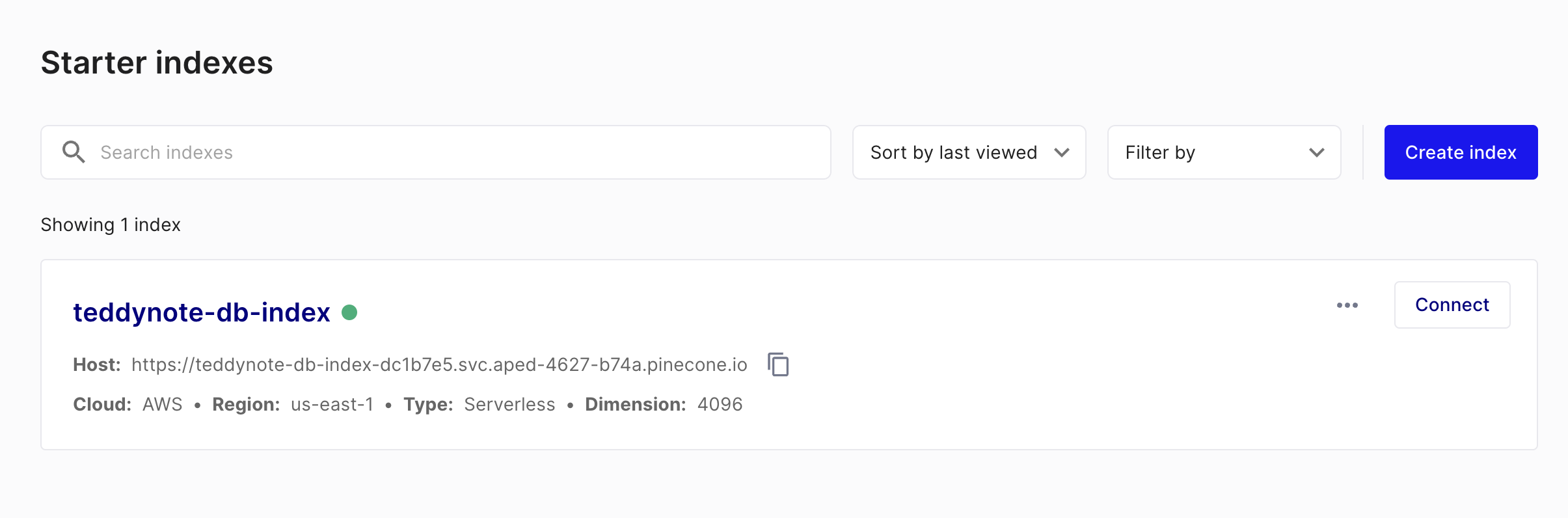
index_name="teddynote-db-index", # Specifies the index name.
dimension=4096, # Embedding Align with the dimension. (OpenAIEmbeddings: 1536, UpstageEmbeddings: 4096)
metric="dotproduct", # Specifies how to measure similarity. (dotproduct, euclidean, cosine)
)
```
```
[create_index]
{'dimension': 4096,
'index_fullness': 0.0,
'namespaces': {'': {'vector_count': 0},
'teddynote-namespace-01': {'vector_count': 867},
'teddynote-namespace-02': {'vector_count': 867}},
'total_vector_count': 1734}
```
Below is an example using a paid Pod. Paid Pods provide more extended features than free Serverless Pods.
* reference:
```
import os
from langchain_teddynote.community.pinecone import create_index
from pinecone import PodSpec
# Pinecone create index
pc_index = create_index(
api_key=os.environ["PINECONE_API_KEY"],
index_name="teddynote-db-index2", # Specify an index name.
dimension=4096, # Embedding Align with the dimension. (OpenAIEmbeddings: 1536, UpstageEmbeddings: 4096)
metric="dotproduct", # Specifies how to measure similarity. (dotproduct, euclidean, cosine)
pod_spec=PodSpec(
environment="us-west1-gcp", pod_type="p1.x1", pods=1
), # Use paid Pods
)
```
```
[create_index]
{'dimension': 4096,
'index_fullness': 0.0,
'namespaces': {},
'total_vector_count': 0}
```
### Sparse Encoder generation
* Sparse Encoder creates.
* `Kiwi Tokenizer` Wow, Korean stop words(stopwords) Perform processing.
* We learn contents using Sparse Encoder. The learned encoding here is used to create Sparse Vector when saving documents to VectorStore.
```
from langchain_teddynote.community.pinecone import (
create_sparse_encoder,
fit_sparse_encoder,
)
# Uses Korean stopword dictionary + Kiwi morphological analyzer.
sparse_encoder = create_sparse_encoder(stopwords(), mode="kiwi")
```
Learn Corpus in Sparse Encoder.
* `save_path`: This is the path to save the Sparse Encoder. This will be used later when loading the Sparse Encoder saved in pickle format and embedding the query. Therefore, specify the path to save it.
```
# Sparse Encoder Learn contents using
saved_path = fit_sparse_encoder(
sparse_encoder=sparse_encoder, contents=contents, save_path="./sparse_encoder.pkl"
)
```
```
[fit_sparse_encoder]
Saved Sparse Encoder to: ./sparse_encoder.pkl
```
\[Optional] Below is the code you use when you need to reload the Sparse Encoder you learned and saved later.
```
from langchain_teddynote.community.pinecone import load_sparse_encoder
# Learned later sparse encoder Used when calling.
sparse_encoder = load_sparse_encoder("./sparse_encoder.pkl")
```
```
[load_sparse_encoder]
Loaded Sparse Encoder from: ./sparse_encoder.pkl
```
Pinecone: Upsert to DB Index
* `context`: Here are the contents of the document.
* `page`: The page number of the document.
* `source`: This is the source of the document.
* `values`: Embedder Embedding of documents obtained through .
* `sparse values`: Sparse Encoder Embedding of documents obtained through .
```
from langchain_openai import OpenAIEmbeddings
from langchain_upstage import UpstageEmbeddings
openai_embeddings = OpenAIEmbeddings(model="text-embedding-3-large")
upstage_embeddings = UpstageEmbeddings(model="solar-embedding-1-large-passage")
```
Upsert documents in batches without distributing them. If the number of documents is not large, use the method below.
```
%%time
from langchain_teddynote.community.pinecone import upsert_documents
from langchain_upstage import UpstageEmbeddings
upsert_documents(
index=pc_index, # Pinecone Index
namespace="teddynote-namespace-01", # Pinecone namespace
contents=contents, # Previously preprocessed document contents
metadatas=metadatas, # Previously preprocessed document metadata
sparse_encoder=sparse_encoder, # Sparse encoder
embedder=upstage_embeddings,
batch_size=32,
)
```
```
[upsert_documents]
{'dimension': 4096,
'index_fullness': 0.0,
'namespaces': {'teddynote-namespace-01': {'vector_count': 866}},
'total_vector_count': 866}
CPU times: user 14.4 s, sys: 576 ms, total: 14.9 s
Wall time: 2min 37s
```
Below is a method to quickly Upsert large documents by performing distributed processing. Use it when uploading large quantities.
```
%%time
from langchain_teddynote.community.pinecone import upsert_documents_parallel
upsert_documents_parallel(
index=pc_index, # Pinecone 인덱스
namespace="teddynote-namespace-02", # Pinecone namespace
contents=contents, # Previously preprocessed document contents
metadatas=metadatas, # Previously preprocessed document metadata
sparse_encoder=sparse_encoder, # Sparse encoder
embedder=upstage_embeddings,
batch_size=64,
max_workers=30,
)
```
```
A total of 866 Vectors were Upsert.
{'dimension': 4096,
'index_fullness': 0.0,
'namespaces': {'teddynote-namespace-01': {'vector_count': 866},
'teddynote-namespace-02': {'vector_count': 866}},
'total_vector_count': 1732}
CPU times: user 11.3 s, sys: 306 ms, total: 11.6 s
Wall time: 14.8 s
```
## Index lookup/delete
The describe\_index\_stats method provides statistical information about the contents of an index. This method provides information such as the number of vectors per namespace and the number of dimensions.
Parameters \* filter (Optional\[Dict\[str, Union\[str, float, int, bool, List, dict]]]): A filter that returns only statistics for vectors that meet a certain condition. Defaults to None \* \*\*kwargs: Additional keyword arguments.
Return value \* DescribeIndexStatsResponse: An object containing statistics information about the index.
Usage examples \* Basic usage: index.describe\_index\_stats() \* Applying a filter: index.describe\_index\_stats(filter={'key': 'value'})
Note - metadata filtering is available to paid users only.
```
# Index lookup
pc_index.describe_index_stats()
```
```
{'dimension': 4096, 'index_fullness': 0.0, 'namespaces': {'teddynote-namespace-01': {'vector_count': 866}, 'teddynote-namespace-02': {'vector_count': 866}}, 'total_vector_count': 1732}
```
## Delete namespace
```
from langchain_teddynote.community.pinecone import delete_namespace
delete_namespace(
pinecone_index=pc_index,
namespace="teddynote-namespace-01",
)
```
```
All data in namespace 'teddynote-namespace-01' has been deleted.
```
```
pc_index.describe_index_stats()
```
```
{'dimension': 4096, 'index_fullness': 0.0, 'namespaces': {'teddynote-namespace-02': {'vector_count': 866}}, 'total_vector_count': 866}
```
### Below are features exclusive to paid users. Metadata filtering is available to paid users.
```
from langchain_teddynote.community.pinecone import delete_by_filter
# metadata Delete by filtering (paid feature)
delete_by_filter(
pinecone_index=pc_index,
namespace="teddynote-namespace-02",
filter={"source": {"$eq": "SPRi AI Brief_8Wolho_Industry Trends.pdf"}},
)
pc_index.describe_index_stats()
```
```
{'dimension': 4096, 'index_fullness': 0.0, 'namespaces': {'teddynote-namespace-02': {'vector_count': 743}}, 'total_vector_count': 743}
```
## Create a Retriever
Setting PineconeKiwiHybridRetriever initialization parameters
The init\_pinecone\_index function and the PineconeKiwiHybridRetriever class implement a hybrid retrieval system using Pinecone, which combines dense and sparse vectors to perform effective document retrieval.
Pinecone Index Initialization
The init\_pinecone\_index function initializes a Pinecone index and sets up the necessary components.
Parameters \* index\_name (str): Pinecone index name \* namespace (str): Namespace to use \* api\_key (str): Pinecone API key \* sparse\_encoder\_pkl\_path (str): Path to the sparse encoder pickle file \* stopwords (List\[str]): List of stopwords \* tokenizer (str): Tokenizer to use (default: "kiwi") \* embeddings (Embeddings): Embedding model \* top\_k (int): Maximum number of documents to return (default: 10) \* alpha (float): Weighting parameter to adjust the density and sparse vectors (default: 0.5)
Main functions 1. Initialize Pinecone index and output statistics information 2. Load sparse encoder (BM25) and set tokenizer 3. Specify namespace
```
from langchain_teddynote.community.pinecone import init_pinecone_index
pinecone_params = init_pinecone_index(
index_name="teddynote-db-index2", # Pinecone Index name
namespace="teddynote-namespace-02", # Pinecone Namespace
api_key=os.environ["PINECONE_API_KEY"], # Pinecone API Key
sparse_encoder_path="./sparse_encoder.pkl", # Sparse Encoder 저장경로(save_path)
stopwords=stopwords(), # Dictionary of stop words
tokenizer="kiwi",
embeddings=UpstageEmbeddings(
model="solar-embedding-1-large-query"
), # Dense Embedder
top_k=5, # Top-K Number of documents returned
alpha=0.5, # alpha=0.75If set to, (0.75: Dense Embedding, 0.25: Sparse Embedding)
)
```
```
[init_pinecone_index]
{'dimension': 4096,
'index_fullness': 0.0,
'namespaces': {'teddynote-namespace-02': {'vector_count': 743}},
'total_vector_count': 743}
```
#### PineconeKiwiHybridRetriever
The PineconeKiwiHybridRetriever class implements a hybrid retriever that combines Pinecone and Kiwi.
Key properties \* embeddings: Embedding model for dense vector transformation \* sparse\_encoder: Encoder for sparse vector transformation \* index: Pinecone index object \* top\_k: Maximum number of documents to return \* alpha: Weighting parameter for dense and sparse vectors \* namespace: Namespace within the Pinecone index
Features \* HybridSearch Retriever that combines dense and sparse vectors \* Optimization of search strategy through weight adjustment \* Various dynamic metadata filtering can be applied (using search\_kwargs: filter, k, rerank, rerank\_model, top\_n, etc.)
Usage Example 1. Initialize required components with the init\_pinecone\_index function 2. Create a PineconeKiwiHybridRetriever instance with the initialized components 3. Perform a hybrid search using the created searcher Create a PineconeKiwiHybridRetriever.
```
from langchain_teddynote.community.pinecone import PineconeKiwiHybridRetriever
# Create a search engine
pinecone_retriever = PineconeKiwiHybridRetriever(**pinecone_params)
```
General Search
```
# Execution results
search_results = pinecone_retriever.invoke("gpt-4o Tell me about the mini release")
for result in search_results:
print(result.page_content)
print(result.metadata)
print("\n====================\n")
```
```
1. Policy/Legislation
2. Business/Industry
3. Technology/Research
4. Personnel/Training
7
OpenAI Releases ‘GPT-4o’ Capable of Real-Time Conversation with People n OpenAI Releases New AI Model ‘GPT-4o’ Capable of Real-Time Voice Conversation with People with a Response Time of Minimum 0.23 Seconds and Average 0.32 Seconds n GPT-4o is Provided as an API, It is Twice as Fast as Existing GPT Models, Costs Half as Much, and Records Top-Level Performance in Multilingual, Audio, and Image-Related Benchmark Tests
====================
GPT-4 Turbo's 86.5% Wow, it surpassed 83.7% of Google Gemini Ultra.
n GPT-4o is available for free to users worldwide, and paid users can ask 5 times more questions than free users.
∙GPT-4o The text and image features will be available immediately starting May 13, and a new version with voice support will be released in the coming weeks for users of the paid service ChatGPT Plus.
∙Developers can access GPT-4o's text and image features via APIs, while audio and video features will be available to a select group of partners in the coming weeks.
{'page': 9.0, 'source': 'SPRi AI Brief_6Wolho_Industry Trend Final.pdf', 'score': 0.3008562}
====================
2. Business/Industry
▹ OpenAI Launches ‘GPT-4o’ Capable of Natural Real-Time Conversation with People··································· 7
▹ OpenAI Superalignment Team, in charge of AI safety research, disbands with resignation of key personnel·················· 8
▹ Google Announces New Gemini Models and Agents, Generating AI Products at Annual Developer Conference··· 9
{'page': 1.0, 'source': 'SPRi AI Brief_6Wolho_Industry Trend Final.pdf', 'score': 0.2881922}
====================
KEY Contents
£ GPT-4o, all inputs and outputs are processed by a single neural network, improving speed and performance over existing models n On May 13, 2024, OpenAI released a new AI model, ‘GPT-4o’, that can interact naturally with people using text, voice, and vision, where o is an abbreviation for ‘omni’, meaning everything ∙ In voice mode, the response time of GPT-4o is a minimum of 232 milliseconds (0.23 seconds) and an average of 320 milliseconds (0.32 seconds), which is similar to the response time of humans and is significantly shortened from the previous models, GPT-3.5 (average of 2.8 seconds) and GPT-4 (5.4 seconds).
{'page': 9.0, 'source': 'SPRi AI Brief_6월호_산업동향 최종.pdf', 'score': 0.28095692}
====================
We plan to pre-release it to some partner groups within the week.
☞ source: OpenAI, Hello GPT-4o, 2024.05.13.
{'page': 9.0, 'source': 'SPRi AI Brief_6Wolho_Industry Trend Final.pdf', 'score': 0.26901308}
====================
```
Use dynamic search\_kwargs - k: specifies the maximum number of documents to return
```
# Execution results
search_results = pinecone_retriever.invoke(
"gpt-4o Tell me about the mini release", search_kwargs={"k": 1}
)
for result in search_results:
print(result.page_content)
print(result.metadata)
print("\n====================\n")
```
```
1. Policy/Legislation
2. Business/Industry
3. Technology/Research
4. Personnel/Training
7
OpenAI Launches ‘GPT-4o’ Capable of Natural Real-Time Conversation with People
n OpenAI is capable of real-time voice conversation with people, with a response time of only 0.23 seconds minimum and 0.32 seconds average.
New AI model ‘GPT-4o’ released for free
n GPT-4o is twice as fast as the existing GPT model when provided as an API, costs half as much, and records top-level performance in multilingual, audio, and image-related benchmark tests.
KEY Contents
{'page': 9.0, 'source': 'SPRi AI Brief_6 Wolho_Industry Trend Final.pdf', 'score': 0.3255687}
====================
```
Use dynamic search\_kwargs - alpha: A parameter to adjust the weights of dense and sparse vectors. Specify a value between 0 and 1. 0.5 is the default, and the closer it is to 1, the higher the weight of dense vectors.
```
# Execution results
search_results = pinecone_retriever.invoke(
"Anthropic", search_kwargs={"alpha": 1, "k": 1}
)
for result in search_results:
print(result.page_content)
print(result.metadata)
print("\n====================\n")
```
```
n Anthropic also updated the developer console to help developers optimize Cloud by creating and testing multiple prompts.
Anthropic will also introduce a ‘system prompt’ feature that will allow users to provide customized guidance to Claude, allowing Claude to respond systematically in a way that is tailored to the user’s needs.
Source : Anthropic, Introducing Claude 2.1, 2023.11.21.
{'page': 7.0, 'source': 'SPRi AI Brief_2024January issue_F.pdf', 'score': 0.3507563}
====================
```
```
# Execution results
search_results = pinecone_retriever.invoke(
"Anthropic", search_kwargs={"alpha": 0, "k": 1}
)
for result in search_results:
print(result.page_content)
print(result.metadata)
print("\n====================\n")
```
```
1. Policy/Legislation
2. Business/Industry
3. Technology/Research
4. Personnel/Training
11
Anthropic Research Finds AI Can Lie Intentionally Like Humans n Anthropic studies LLMs that can perform malicious actions, such as deceiving users and outputting malware when given specific prompts
n According to Anthropic, even after safety training for LLMs engaging in deceptive behavior, they were unable to eliminate it, and instead, their accuracy in responding to prompts that triggered the behavior improved.
n
KEY Contents
£ Anthropic, LLM study on tricking users and outputting malware
{'page': 13.0, 'source': 'SPRi AI Brief_2024년3월호_F.pdf', 'score': 0.7349932}
====================
```
## Metadata Filtering
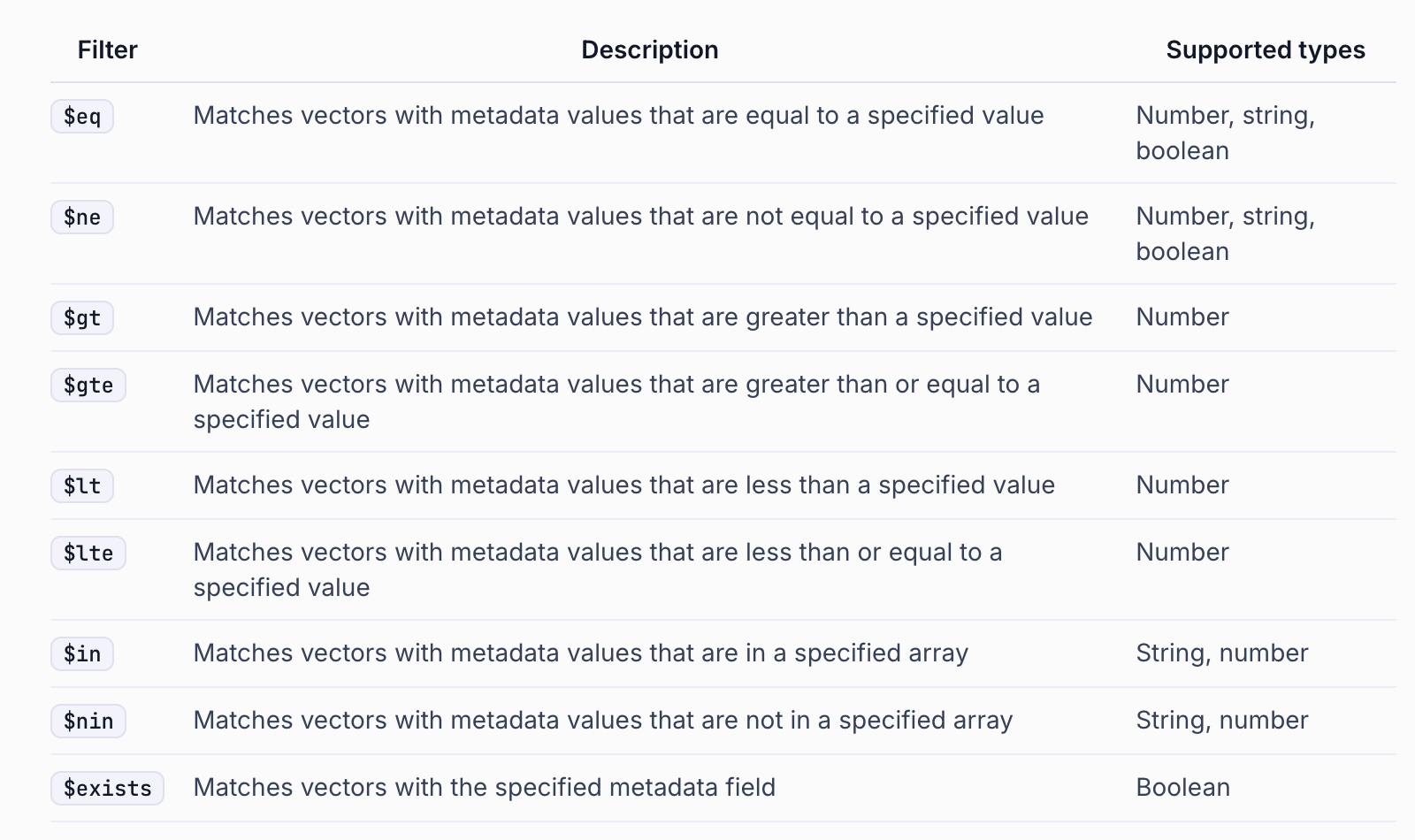
Using dynamic search\_kwargs - filter: Apply metadata filtering
(Example) Search only documents with pages less than 5.
```
# Execution results
search_results = pinecone_retriever.invoke(
"Tell me about the release of claude from Anthropic",
search_kwargs={"filter": {"page": {"$lt": 5}}, "k": 2},
)
for result in search_results:
print(result.page_content)
print(result.metadata)
print("\n====================\n")
```
```
▹ Anthropic Releases Latest AI Model ‘Claude 3.5 Sonnet’··························································· 10
▹ France's Mistral AI attracts €600 million in investment························································ 11
{'page': 1.0, 'source': 'SPRi AI Brief_7월호_산업동향.pdf', 'score': 0.31394503}
====================
2. Business/Industry
▹ Google Unveils Multimodal AI Model ‘Gemini’············································································ 3
▹ Google Cloud Adds Image Generation AI ‘Imagine 2’ to Enterprise AI Platform························· 4
▹ Anthropic Releases ‘Claude 2.1’ Capable of Entering 200,000 Tokens··································· 5
{'page': 1.0, 'source': 'SPRi AI Brief_2024 January issue_F.pdf', 'score': 0.2237935}
====================
```
dynamic `search_kwargs` use - `filter`: metadata Apply filtering
(example) `source` go `SPRi AI Brief_8` Search within the document Wolho\_Industry\_Trends.pdf.
```
# Execution results
search_results = pinecone_retriever.invoke(
""Tell me about the release of Anthropic's Claude 3.5",
search_kwargs={
"filter": {"source": {"$eq": "SPRi AI Brief_7 Wolho_Industry Trends.pdf"}},
"k": 3,
},
)
for result in search_results:
print(result.page_content)
print(result.metadata)
print("\n====================\n")
```
```
▹ Anthropic Releases Latest AI Model ‘Claude 3.5 Sonnet’··························································· 10
▹ France's Mistral AI attracts €600 million in investment························································ 11
{'page': 1.0, 'source': 'SPRi AI Brief_7월호_산업동향.pdf', 'score': 0.357203}
====================
1. Policy/Legislation
2. Business/Industry
3. Technology/Research
4. Personnel/Training
9
Anthropic Releases Latest AI Model ‘Claude 3.5 Sonnet’
n Anthropic unveiled its latest AI model, ‘Claude 3.5 Sonnet’, the highest performing model among its previous models.
‘Emphasizes that it is superior to Claude 3 Opus or OpenAI's latest model 'GPT-4o'
n Anthropic allows you to check and edit codes or documents created by Claude in real time.
New ‘Artifact’ feature also released
KEY Contents
{'page': 11.0, 'source': 'SPRi AI Brief_7Wolho_Industry Trends.pdf', 'score': 0.35153997}
====================
New ‘Artifact’ feature also released
KEY Contents
£ Claude 3.5 Sonnet, surpassing previous flagship models Claude 3 Opus and OpenAI's GPT-4o n Anthropic unveiled Sonnet, the first of the Claude 3.5 model family, on June 21, 2024, and plans to release the lightweight model Haiku and the most powerful Opus in the second half of the year ∙ Sonnet is available for free on the Claude.ai website and iOS app, and is provided with significantly expanded usage limits for paid subscribers.
{'page': 11.0, 'source': 'SPRi AI Brief_July Issue_Industry Trends.pdf', 'score': 0.34043252}
====================
```
#### Reranking apply
You can get retrieval - reranker results by simply applying search\_kwargs.
(However, reranker is a paid feature, so please check the fee system in advance.)
Reference Documents
* [Pinecone Rerank ](https://docs.pinecone.io/guides/inference/rerank)Document
* Model and Rate System
```
# reranker Unused
retrieval_results = pinecone_retriever.invoke(
"Claude Sonnet of Anthropic",
)
# BGE-reranker-v2-m3 Using the model
reranked_results = pinecone_retriever.invoke(
"Claude Sonnet of Anthropic",
search_kwargs={"rerank": True, "rerank_model": "bge-reranker-v2-m3", "top_n": 3},
)
```
```
# retrieval_results 와 reranked_results compare.
for res1, res2 in zip(retrieval_results, reranked_results):
print("[Retrieval]")
print(res1.page_content)
print("\n------------------\n")
print("[Reranked] rerank_score: ", res2.metadata["rerank_score"])
print(res2.page_content)
print("\n====================\n")
```
```
[Retrieval]
1. Policy/Legislation
2. Business/Industry
3. Technology/Research
4. Personnel/Training
9
Anthropic Releases Latest AI Model ‘Claude 3.5 Sonnet’
n Anthropic unveiled its latest AI model, ‘Claude 3.5 Sonnet’, the highest performing model among its previous models.
‘Emphasizes that it is superior to Claude 3 Opus or OpenAI's latest model 'GPT-4o'
n Anthropic allows you to check and edit codes or documents created by Claude in real time.
New ‘Artifact’ feature also released
KEY Contents
------------------
[Reranked] rerank_score: 0.99635005
1. Policy/Legislation
2. Business/Industry
3. Technology/Research
4. Personnel/Training
9
Anthropic Releases Latest AI Model ‘Claude 3.5 Sonnet’ n Anthropic unveils its latest AI model
‘Claude 3.5 Sonnet’ and emphasizes that it
KEY Contents
====================
[Retrieval]
▹ Anthropic Releases Latest AI Model ‘Claude 3.5 Sonnet’··························································· 10
▹ France's Mistral AI attracts €600 million in investment························································ 11
------------------
[Reranked] rerank_score: 0.9956346
New ‘Artifact’ feature also released
KEY Contents
£ Claude 3.5 Sonnet, outperforms previous flagship models Claude 3 Opus and OpenAI's GPT-4o
n Anthropic will unveil the ‘Sonnet’ as the first of the ‘Claude 3.5’ model range on June 21, 2024
and plans to launch the lightweight model ‘Haiku’ and the most powerful ‘Opus’ in the second half of the year.
Sonnet is available for free on the Claude website (Claude.ai) and iOS app, and is available to paid subscribers.
Provides significantly expanded limits
====================
[Retrieval]
1. Policy/Legislation
2. Business/Industry
3. Technology/Research
4. Personnel/Training
Anthropic Releases ‘Claude 2.1’ Capable of Entering 200,000 Tokens
n Anthropic has released version ‘Claude 2.1’ which supports up to 200,000 token inputs and reduces hallucinations by two times.
It was disclosed, and 200,000 token inputs are only available in the paid version, ‘Claude Pro’.
n Cloud 2.1 introduces a beta version of the tooling feature that allows users to connect to APIs to perform complex numerical calculations.
Supports a variety of tasks, such as using a calculator for inference or answering questions using web searches.
------------------
[Reranked] rerank_score: 0.94240075
▹ Anthropic Releases Latest AI Model ‘Claude 3.5 Sonnet’··························································· 10
▹ France's Mistral AI attracts €600 million in investment························································ 11
====================
```